
"But we can't read it. And neither can our friends." That is what one bride's mother said, out loud, in front of everyone, looking at a wedding website built in a single language. It is the kind of moment couples spend months trying to avoid: a grandparent squinting at a screen, a whole side of the family quietly left out of their own relative's wedding.
It happens more than anyone admits. Couples who marry across languages end up hand-building fixes: a screenshot of the details translated in a notes app, a second website in the other language, a French-only link they send separately and hope nobody compares. One bride, after trying the popular website builders, put it plainly: even where you can add a translation underneath each section, the date, the location, and the RSVP button stay stuck in one language. Names in the title only work in one script or the other, never both.
A wedding website in one language is not a small oversight when your guest list is not. This guide shows the real setup: how to turn on the languages you need, how to add your content in each one, and exactly what a guest sees when they open your site in English, Arabic, or French, including Arabic laid out correctly, right to left.
The short version
- One website, one link, multiple languages. No second site to build or keep in sync.
- You choose which languages to offer and enter your content once per language.
- Guests see the site in your primary language by default, and can switch with one tap.
- Arabic is not just translated text bolted onto an English layout. The whole page mirrors: navigation, alignment, reading order, right to left.
- The event website, including its language settings, is part of Laylaty's Essential plan and up.
What "RTL" and "localization" actually mean
Two words worth defining before you start, since they explain why this is harder than it sounds.
Localization means showing content in the visitor's own language, not just translating words but adapting the whole experience, dates, layout, and all, to read naturally in that language.
RTL stands for right to left, the reading direction of Arabic (also Hebrew and a few others). It is not a font change. A right-to-left page mirrors the entire layout: the navigation moves to the other side, text aligns to the right, and the reading order flows from the right edge of the screen to the left. A page that is merely translated into Arabic but still laid out left to right reads backwards to a native reader, which is exactly the broken result couples run into with tools that treat Arabic as an afterthought.
Step 1: Turn on the languages you want to offer
Open your event and go to Edit Event. Under Language Settings, you set your primary language, the one every guest sees unless they choose otherwise, and then switch on any additional languages you want to offer. Laylaty supports nine: English, Arabic, German, Spanish, Finnish, French, Japanese, Swedish, and Chinese.
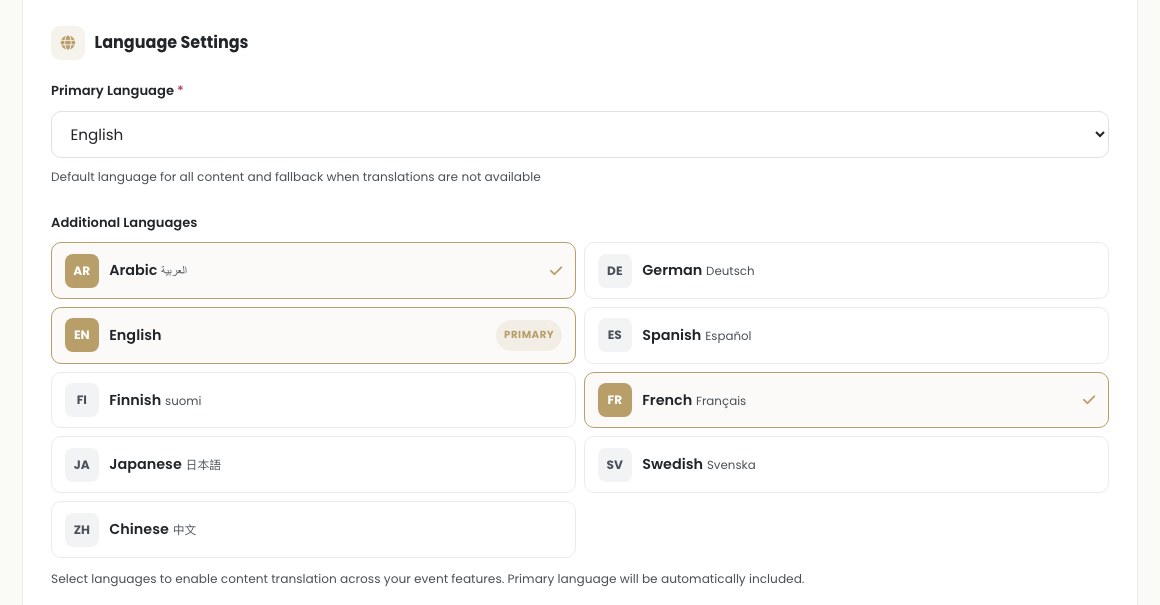
This is the first of two steps, and it is easy to miss the second one. Turning a language on makes it available. It does not, by itself, give your site anything to say in that language, that is the next step.
Tip
Pick the languages your actual guest list needs, not every language available. Two or three well-filled-in languages read far better than five with gaps.
Step 2: Add your content in each language
Wherever you write copy for your site, the event name, your welcome message, your story, each field with a globe icon opens a tab per enabled language. Fill in English, then switch tabs and write the Arabic and French versions. Leave a field blank in a given language and Laylaty quietly falls back to your primary language, so an unfinished translation never shows up as an empty gap on your site.
This is the part a bolted-on translator cannot do. You are not running your wedding date through an auto-translator and hoping the grammar survives. You write the actual words a guest in that language will read, in your own voice, including the parts that trip up machine translation: your names, your venue, and the small phrases that carry warmth.
Tip
Ask a fluent relative to check your Arabic or French wording before you publish. A native speaker catches the tone a translator tool cannot.
Step 3: What your guests actually see
This is where the two steps above pay off. Open your site and it appears in your primary language first, then everything, the countdown, the navigation, your story, the RSVP button, mirrors correctly the moment a guest switches.
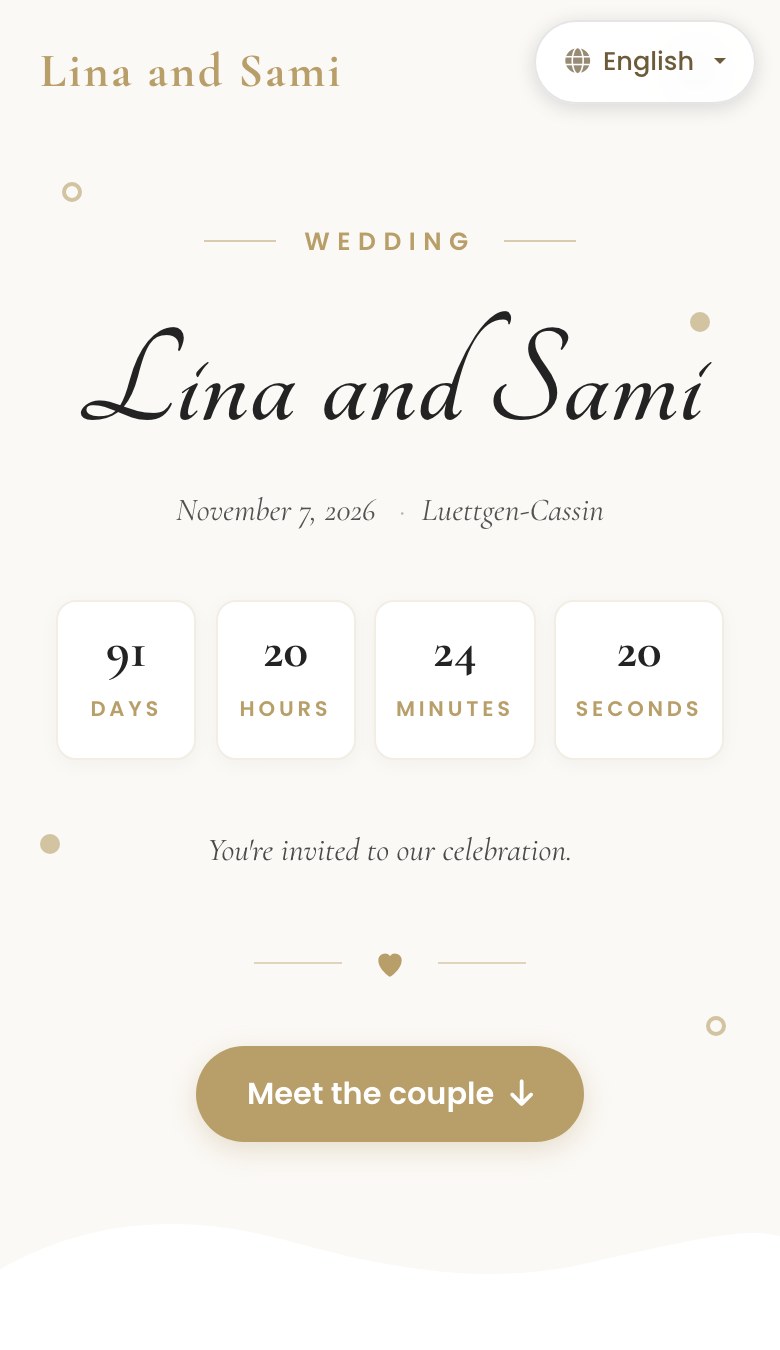
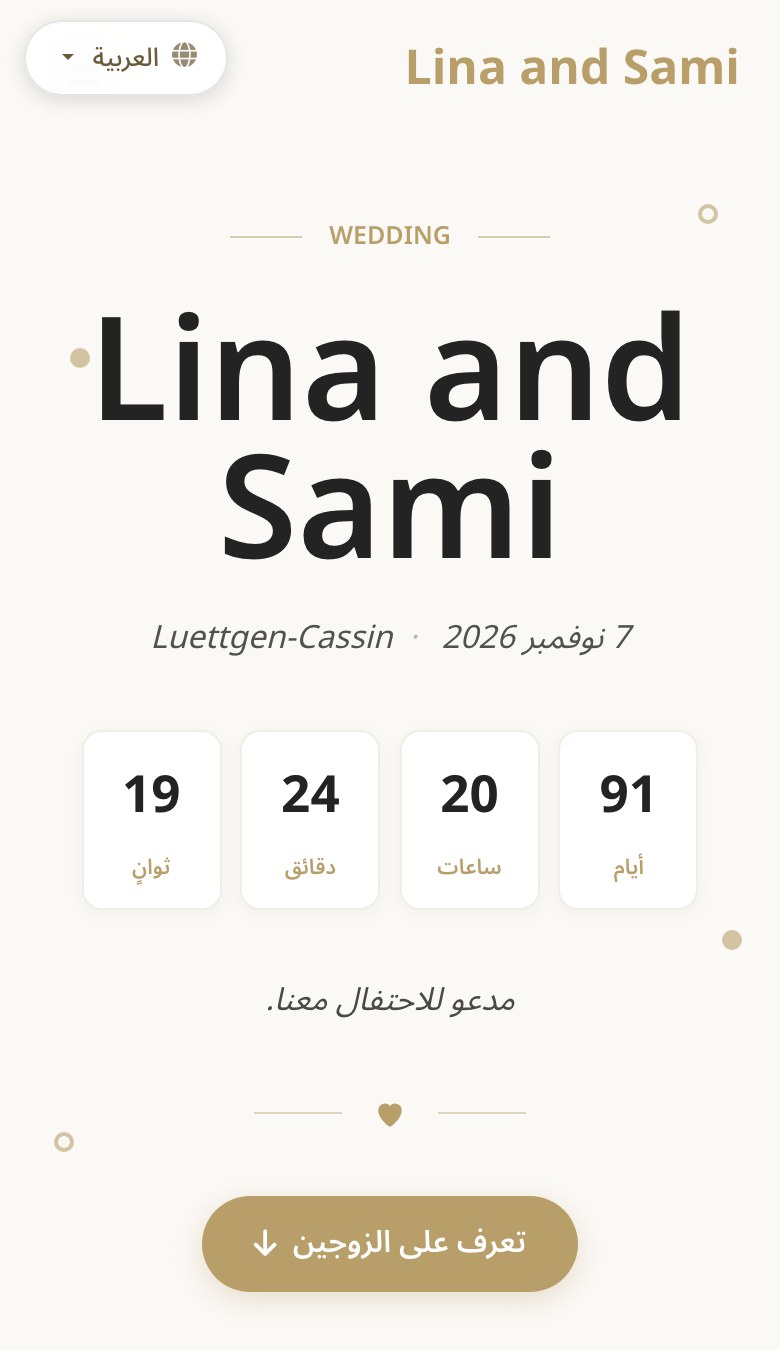
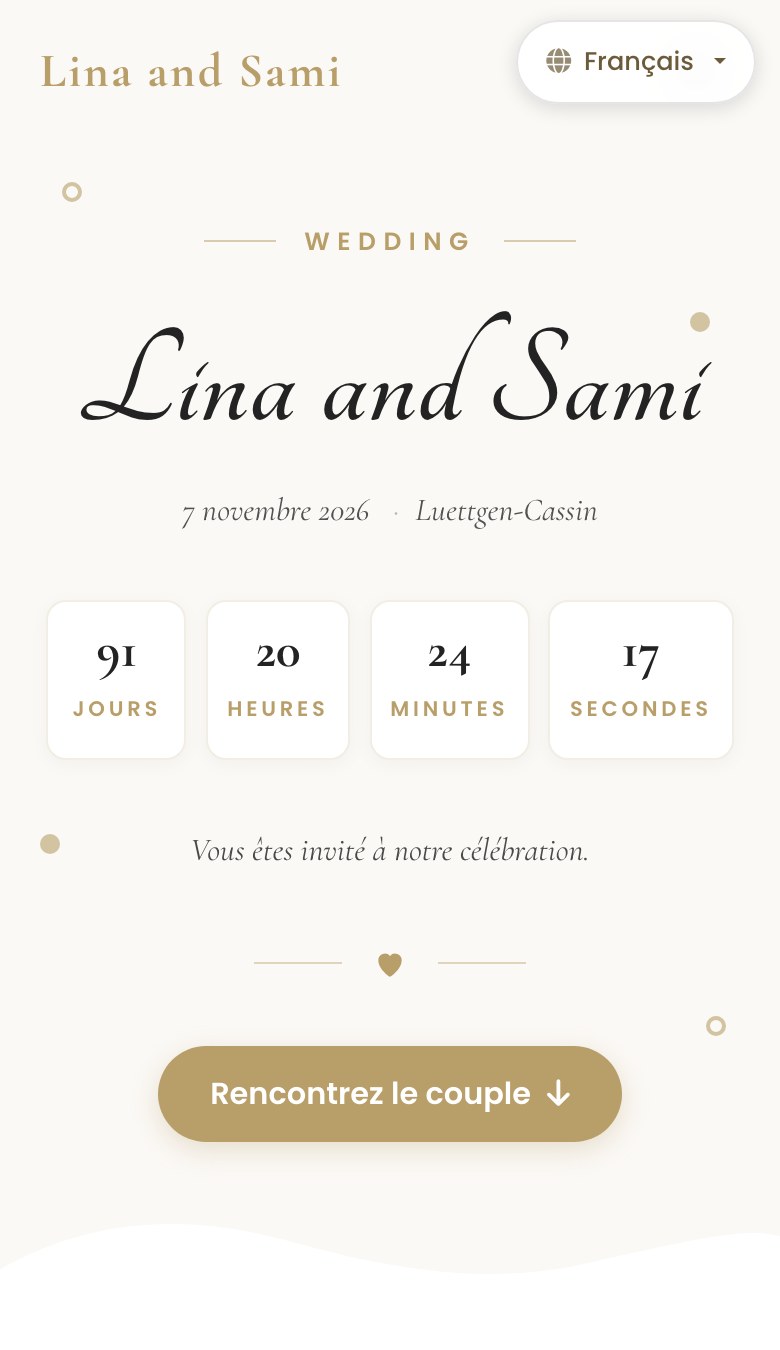
Notice what has not changed: the photos, the countdown, the layout rhythm, all identical. What changes is the language and, for Arabic, the entire direction of the page. This is one website with three faces, not three websites to maintain.
Step 4: The switcher your guests use
Every guest can change the language themselves, right there on the page, in one tap.
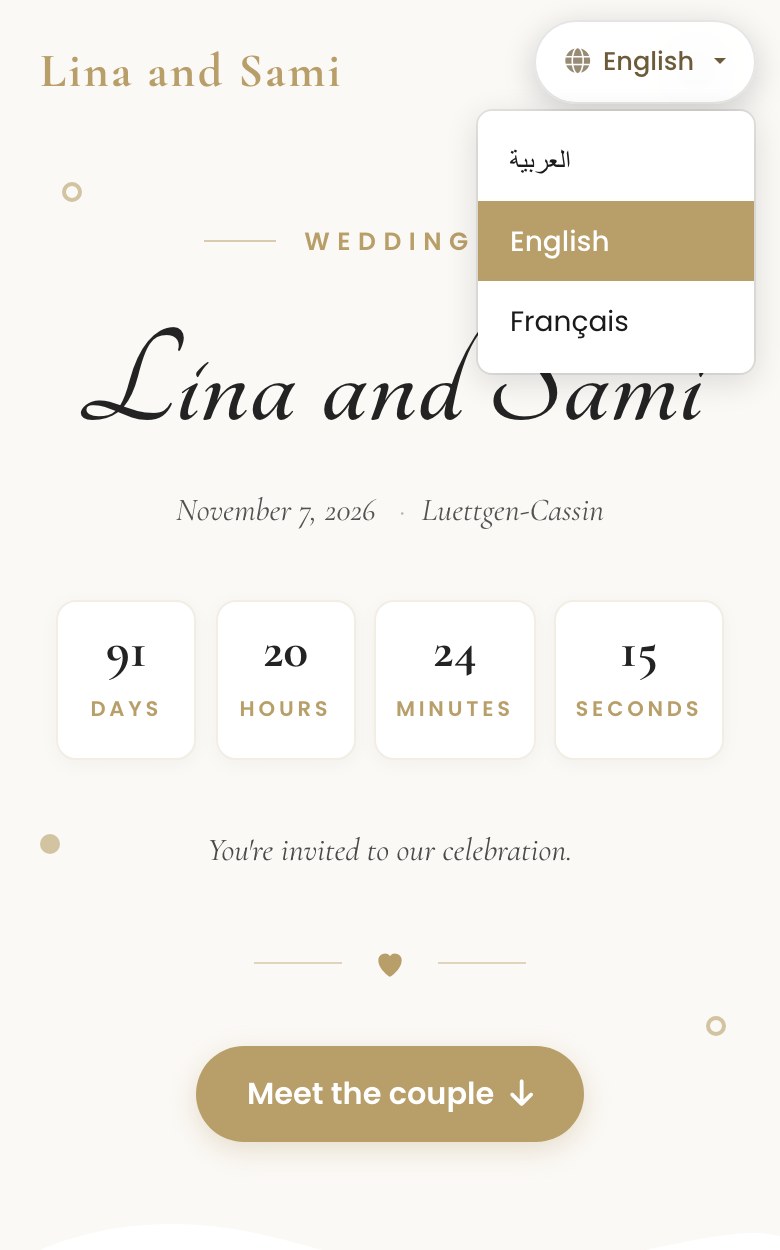
This matters more than it looks. A guest who lands on the site in whatever language you set as primary is never stuck there. Your Arabic-speaking aunt taps "العربية" and reads the whole page in Arabic, correctly mirrored, without ever asking you for help. A returning guest's choice is remembered, so they are not re-selecting their language every time they come back to check the details.
Make it your own
A few dials worth knowing about:
- Which languages you offer. Turn on only the ones your guest list actually needs, from the nine available.
- Your primary language. The one a first-time visitor sees, before they touch the switcher. Set it to the language most of your guests share.
- Per-language content. Every section with a globe icon, your event name, your welcome message, your story, your FAQ, can be written separately per language, not machine-translated.
- What is left untranslated. Any field you skip in a given language quietly falls back to your primary language rather than showing blank, so a partial translation never looks broken.
An honest note on what this is not
This is a real, native localization of your site's content and layout, not a browser plugin translating words on top of a page that was never designed for them. That said, it is worth being precise about what it covers: dates and countdown numbers on the site itself currently still appear in ordinary digits even on the Arabic version, only the words and the layout direction change. If that detail matters to you, mention it to a fluent relative reviewing the page before you publish.
Frequently asked questions
Do I need to build a separate website for each language?
No. It is one event, one link, one website. Guests choose their language from the same page, and you maintain one set of photos, one countdown, and one RSVP flow underneath all of them.
Will Arabic actually read right to left, or is it just translated text?
It reads right to left. The whole layout mirrors, not just the words, so navigation, alignment, and reading order all flip correctly for a native Arabic reader.
What happens if I forget to fill in a language I turned on?
Any field you leave blank in that language shows your primary language instead, so guests never see an empty gap, only unfinished sections you have not gotten to yet.
Is the multilingual website free?
The event website, including its language settings, is part of Laylaty's Essential plan and up, priced per event. It is not bundled into the free plan.
Can guests switch languages on their own, or do I have to send separate links?
They switch themselves, in one tap, from a switcher on the page. You send one link to everyone.
Ready to make your site legible for every guest?
Turn on the languages your family and friends actually read, add your story in each one, and send the one link that speaks to everyone who opens it.